At Tarfin, Europe's leading fintech platform for farmer agri-input financing, thousands of farmers have chosen us to purchase their seeds, fertilizers, feed and equipment with flexible payment terms. Founded in 2017 in Turkey, we help farmers across 75+ cities by letting them compare prices from 1200+ retailers and purchase agri-inputs without tying up their cash. Since 2021, we've expanded to Romania, bringing the same farmer-friendly financing model to help small and medium-sized farmers access agricultural inputs without guarantees or hidden costs.
When we started building our system, we followed the best practices known at the time: storing monetary values as integers in the database to avoid floating-point rounding issues. However, as our business grew and became more sophisticated, we discovered that even this approach wasn't sufficient. This article shares our journey of migrating from 2 decimal precision to a DECIMAL(29,16) structure in our database - that's 13 digits before the decimal point and 16 after.
After experiencing the limitations of integer storage, we adopted the Brick/Money library for all monetary operations in our Laravel application:
The Foundation: Brick/Money Library
use Brick\Math\RoundingMode;
use Brick\Money\Money;
use Brick\Money\Context\CustomContext;

// Before: 2 decimal precision
$context2 = new CustomContext(2);
$price = Money::of(999.99, "USD", $context2);
$commission = $price->multipliedBy("0.025", RoundingMode::HALF_UP); // 25 USD

// After: 16 decimal precision
$context16 = new CustomContext(16);
$price = Money::of("999.9999999999999", "USD", $context16);
$commission = $price->multipliedBy("0.025", RoundingMode::HALF_UP); // 24.9999999999999975 USD
Our Starting Point: Integer Storage
When we started building Tarfin, we knew about the dangers of floating-point arithmetic. The classic example every developer learns:
// The famous floating-point precision problem
$a = 0.1;
$b = 0.2;
$sum = $a + $b;

var_dump($sum === 0.3); // bool(false)!
printf("%.17f", $sum);  // 0.30000000000000004
This happens because computers store floating-point numbers in binary (base 2), and many decimal fractions cannot be represented exactly in binary. Just like 1/3 cannot be precisely represented in decimal (0.333...), 0.1 cannot be precisely represented in binary.
That's why we followed the best practice of storing monetary values as integers:
// Instead of storing 100.50 USD as float
$price = 100.50; // Dangerous!

// We stored it as integer cents
$priceInCents = 10050; // Safe from floating-point errors
The integer storage approach had several advantages:
Exact Representation
// Float storage problems
$dbPrice = 19.99;
$quantity = 3;
$total = $dbPrice * $quantity; // 59.97... or is it?
printf("%.17f", $total); // 59.96999999999999886

// Integer storage (cents)
$dbPriceCents = 1999;
$quantity = 3;
$totalCents = $dbPriceCents * $quantity; // Exactly 5997
$totalUSD = $totalCents / 100; // 59.97
Consistent Database Operations
-- Float columns can have comparison issues
SELECT *
FROM orders
WHERE total = 59.97;
-- Might miss rows!

-- Integer columns are reliable
SELECT *
FROM orders
WHERE total_cents = 5997; -- Always works
No Accumulating Errors
// Float accumulation problem
$balance = 0.0;
for ($i = 0; $i < 10000; $i++) {
    $balance += 0.01;}
echo $balance; // 100.00000000001 (should be 100.00)
               // Note: exact error may vary by system/PHP version

// Integer accumulation is perfect
$balanceCents = 0;
for ($i = 0; $i < 10000; $i++) {
    $balanceCents += 1;}
echo $balanceCents / 100; // Exactly 100.00
This integer approach worked well for amounts with 2 decimal places, but our business requirements soon exceeded these limitations.
Why 2 Decimal Places Weren't Enough
Income Protected Sales (IPS)
Our Income Protected Sales (IPS) model - what we call "Gelir Korumalı Satış" in Turkish - is essentially a commodity price hedging mechanism for farmers. In this payment system, farmers can choose to pay based on the average commodity prices at their selected payment date, rather than the purchase date. This protects them from price volatility in agricultural markets.
For example, a farmer buying fertilizer in March can choose to pay in October based on October's wheat prices. If wheat prices rise, they pay less; if prices fall, they're protected by minimum price guarantees. This hedging mechanism requires extreme precision in calculations:
// Example: 1000 USD sale equals 100kg of wheat
$cashPrice = '1000.00';
$wheatAmount = '100.1234567890123456'; // kg
$wheatPrice = '9.876543210987654321'; // USD/kg

// With 2 decimals:
$result = round(100.12 * 9.88, 2); // 989.19 USD

// Actual value:
$result = '989.1851851851851851...'; // Significant difference!
VAT Calculations on Small Unit Price Products
Seeds and similar agricultural inputs often have very small unit prices but are purchased in large quantities. This is where VAT (KDV in Turkish) calculation precision becomes critical:
// Example: Seed with small unit price
$unitPrice = '0.05'; // 0.05 USD per seed
$quantity = 100000; // Farmer buys 100,000 seeds
$vatRate = 8; // 8% VAT

// With 2 decimal precision:
$unitPriceWithoutVat = round(0.05 / 1.08, 2); // 0.05 USD (wrong!)
$vatAmount = 0.00; // No VAT calculated!

// With 16 decimal precision:
$unitPriceWithoutVat = '0.0462962962962963'; // Correct
$vatAmount = '0.0037037037037037'; // Correct VAT

// For 100,000 seeds:
// 2 decimals: 0 USD VAT loss
// 16 decimals: 370.37 USD VAT correctly calculated
When farmers purchase tens or hundreds of thousands of these small-unit items, rounding errors compound into significant amounts.
Float vs String: The IEEE-754 Problem
What is IEEE-754?
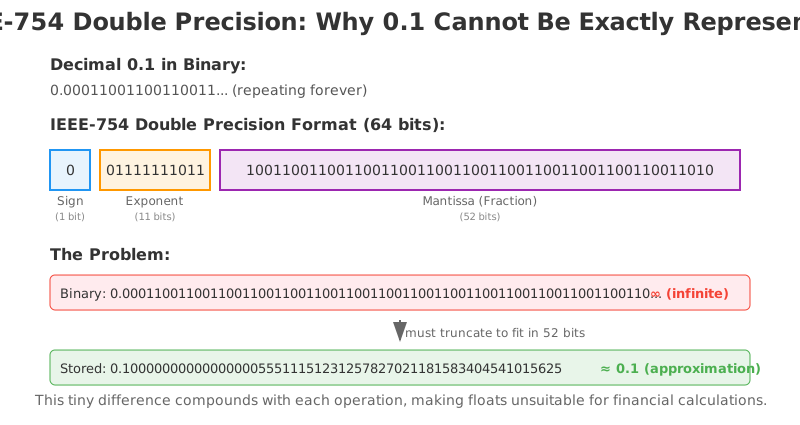
IEEE-754 is the standard for floating-point arithmetic used by virtually all modern computers. It represents numbers in binary (base 2) using three components:
Sign bit: Positive or negative
Exponent: The magnitude of the number
Mantissa (fraction): The precision bits
The problem is that many decimal fractions cannot be exactly represented in binary. Just as 1/3 becomes 0.333... (infinite) in decimal, numbers like 0.1 become infinite in binary:
0.1 in decimal = 0.00011001100110011... in binary (repeating forever)Since computers have finite memory, they must truncate this infinite representation, leading to rounding errors.
The Mental Shift: From Float to String
Moving from writing $amount = 1234.567 to $amount = '999999.9999999999999999' requires a fundamental mental shift for developers. It feels unnatural at first to treat numbers as strings, but this becomes inevitable when working with high-precision financial calculations - these precise decimal values simply cannot fit within the IEEE-754 standard without loss of precision.
Real Examples from Our System
Here's something that surprised us: Laravel returns DECIMAL database values as strings, not floats. At first, this seemed odd - why would a numeric database type come back as a string? The answer reveals a deeper truth about precision.
PDO (PHP's database layer) returns DECIMAL values as strings because PHP's float type cannot accurately represent many decimal values. By returning strings, it preserves the exact precision stored in your database. The danger comes when developers, not understanding this protection, convert these strings to floats:
use Brick\Money\Context\CustomContext;
use Brick\Money\Money;

$context = new CustomContext(16);

// PDO correctly returns DECIMAL as string to preserve precision
$dbAmount = "999999.9999999999999999"; // From DECIMAL(29,16) column

// String preserves exact value
$moneyStr = Money::of($dbAmount, "USD", $context);
// Money amount: 999999.9999999999999999

// Developer "helps" by converting to float - DESTROYS precision!
$moneyFloat = Money::of((float) $dbAmount, "USD", $context);
// Money amount: 1000000

// That's a 0.0000000000000001 USD difference that became 1 cent!
The real danger comes from compounding errors in chained operations:
// Chained operations with 16 decimal precision
$dbPrice = '99999.1234567890123456';
$dbDiscount = '0.1234567890123456';    // ~12.35% discount
$dbTax = '0.2000000000000001';         // 20% VAT
$dbCommission = '0.0123456789012345';   // Platform commission

// String approach: preserves all precision
// Float approach: compounds errors at each step
// Difference after 4 operations: 0.0000000006 USD

// Imagine processing thousands of transactions daily!
Performance Considerations
You might worry about performance when using strings instead of floats. In our experience:
The performance difference is negligible for most operations
The accuracy gained far outweighs any minimal performance cost
Database indexes work perfectly with
DECIMAL(29,16)columnsModern databases are optimized for decimal arithmetic
However, there are trade-offs to consider:
Storage: Higher precision means more storage space.
DECIMAL(29,16)uses more bytes thanDECIMAL(10,2)Bulk Operations: When processing hundreds or thousands of calculations, string-based arithmetic is slower than
native float operationsThe Right Balance:
DECIMAL(29,16)was our sweet spot, but your application might need different precision based on
your specific requirements
The Brick/Money library mitigates performance impacts by using optimized arbitrary-precision arithmetic libraries like BCMath or GMP under the hood. These extensions are specifically designed for high-precision calculations and offer the best balance between accuracy and performance for financial applications.
Laravel Implementation Best Practices
Model Casting
Our journey with Laravel model casting evolved through several stages, following our database evolution:
// Stage 0: INTEGER storage (cents) 💰
// Database: amount BIGINT (stored as cents)
protected $casts = [
    'amount' => 'integer',  // 10050 cents = 100.50 USD
];
When we started, we stored monetary values as integers in cents. This worked well for avoiding floating-point issues, but limited us to 2 decimal precision.
After migrating to DECIMAL storage, we discovered something crucial: MySQL returns DECIMAL values as strings to PHP, while FLOAT/DOUBLE columns return as numbers. This happens because DECIMAL values can have precision that exceeds PHP's float capacity (~15 significant digits).
// Stage 1: WRONG - Don't cast DECIMAL to float! ❌
protected $casts = [
    'amount' => 'float',  // This destroys precision!
];
// Database value: '999.9999999999999999'
// After float cast: 1000.0
We never actually implemented Stage 1 in production, but it's a common mistake developers make when transitioning from integer to decimal storage.
// Stage 2: BETTER - Preserve string from database ✅
protected $casts = [
    'amount' => 'string',  // Keeps '999.9999999999999999' intact
];
This was our first working solution with DECIMAL columns. By keeping values as strings, we preserved all precision from the database. However, we still had to manually convert to Money objects everywhere.
// Stage 3: GOOD - Custom Money cast with 2 decimal precision ✅ ✅
protected $casts = [
    'amount' => MoneyCast::class . ':2',  // Auto-converts to Money object
];
Creating a custom cast was a game-changer. Our MoneyCast automatically handled the conversion between DECIMAL database columns and Money objects.
// Stage 4: BEST - Custom Money cast with 16 decimal precision ✅✅✅
protected $casts = [
    'amount' => MoneyCast::class . ':16',  // Full precision Money objects
];

// Full precision maintained throughout the stack
$money = $model->amount; // Money object with 16 decimal precision
$preciseCalculation = $money->multipliedBy('1.0000000000000001');
As we discovered edge cases with seeds, VAT calculations, and Income Protected Sales, we upgraded to 16 decimal precision. This custom cast automatically handles the conversion between our DECIMAL(29,16) database column and Money objects, ensuring precision is maintained throughout the application lifecycle.
Database-Level Precision Verification
When we chose DECIMAL(29,16), we naturally expected MySQL to handle the precision correctly - after all, that's the whole point of the DECIMAL type. But given the critical nature of financial calculations, we decided to verify this assumption with comprehensive tests.
Our curiosity paid off with reassuring results:
-- Test: Can MySQL accurately sum 10 tiny values?
-- 10 x 0.0000000000000001 should equal exactly 0.0000000000000010
SELECT SUM(amount) = 0.0000000000000010 as is_exact
FROM precision_test
WHERE amount = 0.0000000000000001;
-- Result: 1 (TRUE) ✓

-- Test: Can MySQL detect differences at the 16th decimal?
SELECT amount,
       amount = 100.0000000000000000 as equals_100
FROM precision_test
WHERE amount IN (100.0000000000000000, 100.0000000000000001);
-- Results show it correctly distinguishes between the values ✓
These tests confirmed what we hoped: MySQL's DECIMAL implementation is rock-solid. Aggregate functions preserve all decimal places, comparisons work at full precision, and there are no accumulation errors. This means database-level calculations (when needed for performance) won't compromise precision.
However, this doesn't change our golden rule: always pass DECIMAL values as strings to PHP and use Money objects for application-level calculations. The database handles storage and basic operations perfectly, but complex business logic belongs in the application layer with proper money handling libraries.
Database Migration
When we decided to move from integer to DECIMAL(29,16), the migration process taught us valuable lessons:
Schema::table('transactions', function (Blueprint $table) {
    // OLD: Stored as unsigned big integer (minor units)
    $table->unsignedBigInteger('amount'); // Stored in cents

    // NEW: 13 integer digits + 16 decimal places = 29 total precision
    $table->decimal('amount', 29, 16);
});
The actual migration required careful data conversion:
public function up()
{
    // Step 1: Add temporary decimal column
    Schema::table('transactions', function (Blueprint $table) {
        $table->decimal('amount_decimal', 29, 16)->nullable();
    });

    // Step 2: Convert cents to dollars (divide by 100!)
    DB::statement('UPDATE transactions SET amount_decimal = amount / 100');

    // Step 3: Swap columns
    Schema::table('transactions', function (Blueprint $table) {
        $table->dropColumn('amount');
        $table->renameColumn('amount_decimal', 'amount');
    });
}
Money Service Integration
use Brick\Money\Context\CustomContext;
use Brick\Money\Money;

// Context with 16 decimal precision
$context = new CustomContext(16);

// With DECIMAL(29,16), we can store:
// Max: 9,999,999,999,999.9999999999999999 USD (13 digits before, 16 after)
// This is well within safe number ranges for both PHP and JavaScript

// Always pass strings to Money::of()
$money = Money::of($dbAmount, "USD", $context); // Precision preserved

// DECIMAL(29,16) handles large amounts perfectly
$largeAmount = "9999999999999.9999999999999999"; // Max for DECIMAL(29,16)
$money = Money::of($largeAmount, "USD", $context); // Works perfectly
Common Pitfalls When Working with High Precision
After implementing DECIMAL(29,16) and proper model casting, we discovered several non-obvious pitfalls in production:
External Data Sources
The biggest challenges come from data entering your system:
// ❌ WRONG: Trusting external number formats
$csvImport = "1.234,56"; // European format from Excel
$apiResponse = ["amount" => 1.0e-16]; // Scientific notation

// ✅ CORRECT: Normalize before processing
$normalized = str_replace(',', '.', str_replace('.', '', $csvImport)); // Remove thousands separator first
$apiAmount = sprintf('%.16f', $apiResponse['amount']); // Convert scientific to decimal
Money library will throw NumberFormatException for invalid formats, which is good - but it means you need robust input validation in your data pipelines.
JSON Encoding Concerns
When sending monetary values through APIs:
use Brick\Money\Context\CustomContext;
use Brick\Money\Money;

$context = new CustomContext(16);

// ❌ RISKY: Direct JSON encoding might use scientific notation
$data = ["amount" => 0.0000000000000001];
echo json_encode($data); // {"amount":1.0e-16} - Precision lost!

// ✅ CORRECT: Always use strings
$money = Money::of("0.0000000000000001", "USD", $context);
$data = ["amount" => (string) $money->getAmount()]; // Cast to string
echo json_encode($data); // {"amount":"0.0000000000000001"}

// Also watch out for json_decode!
$json = '{"price": 0.0000000000000001}';
$decoded = json_decode($json, true); // $decoded['price'] is float!
$decodedSafe = json_decode($json, true, 512, JSON_BIGINT_AS_STRING);
These real-world issues taught us that high precision requires vigilance not just in calculations, but throughout your entire data flow.
Creative Solution: Automatic Discount Coupons for Rounding Differences
While we were working on our migration from 2 to 16 decimal precision - a significant infrastructure change that would take months to complete - we needed an immediate solution for the rounding differences that were causing daily headaches for our accounting team. Every invoice with a rounding discrepancy meant manual reconciliation work, explanations to farmers, and additional burden on our finance department.
This led us to develop what we initially thought of as a temporary workaround but turned out to be an ingenious approach that solved multiple problems at once. Rather than rushing the precision migration and risking errors, we could take our time to do it right while immediately eliminating the accounting team's reconciliation burden.
The core challenge remained: while we perform all calculations using RationalMoney with infinite precision, our database and financial systems could only store prices with 2 decimal places (0.01 USD minimum). This creates an inevitable precision loss at the very last step - when we must convert our perfectly calculated rational numbers into storable decimal values.
The Mathematical Challenge
Consider this scenario from our Income Protected Sales calculations:
// Target total: 999.99 USD to be distributed across 3 items
// Item ratios: 40%, 35%, 25%

// Perfect rational calculation:
Item 1: 399.996 USD → rounds to 400.00 USD
Item 2: 349.9965 USD → rounds to 350.00 USD
Item 3: 249.9975 USD → rounds to 250.00 USD

// Total after rounding: 1000.00 USD (0.01 USD over!)
Even though we maintain perfect precision throughout all calculations using RationalMoney, the final conversion to 2-decimal storage creates a 0.01 USD discrepancy. Across thousands of transactions, these penny differences could accumulate into significant amounts.
Our Intelligent Solution
Rather than accepting this precision loss or attempting to "fudge" the numbers, we developed an automated system that maintains both mathematical accuracy and accounting integrity. This solution immediately freed our accounting team from manual reconciliation work while we continued our careful migration to 16 decimal precision:
public function handleRoundingDifference(
    IPSPriceCalculationContext $context,
    int $allocatedTotal,
    int $targetTotal
): void {
    $difference = $allocatedTotal - $targetTotal;
    $threshold = config('tarfin.application.max_uncorrected_rounding_difference');

    if ($difference > $threshold) {
        // Create automatic coupon for the exact difference
        $coupon = Coupon::create([
            'code' => 'ROUND-'.Str::random(8),
            'description' => 'Rounding Difference - Automatically created',
            'redemption_limit' => 1,
        ]);

        // Apply proportionally to maintain item ratios
        $this->distributeCouponProportionally($coupon, $order, $difference);
    }
}
How It Preserves Precision
The key insight is that we perform all calculations at the RationalMoney level - with infinite precision - and only encounter rounding when converting to database storage:
private function calculateItemPrices(OrderItem $item, Money $allocatedAmount, RationalMoney $minimumUnitPrice): array
{
    // Work with rational numbers for perfect precision
    $unitWithKdv = $allocatedAmount->toRational()->dividedBy($item->quantity);

    // All VAT calculations happen in rational space
    $prices = $this->calculatePriceComponents($unitWithKdv, $item->kdv);

    // Only at the very end do we convert to 2-decimal Money
    return [
        'unit_w_kdv' => $unitWithKdv,  // Still RationalMoney
        'total_w_kdv_minor' => $totalWithKdv->to(new CustomContext(2), RoundingMode::HALF_UP)
                                    ->getMinorAmount()->toInt()
    ];
}
This approach ensures:
Perfect calculation accuracy: All intermediate calculations use RationalMoney
Transparent correction: Any rounding difference is explicitly recorded as a discount
Proportional distribution: The discount is distributed maintaining the original price ratios
Complete auditability: Every penny is accounted for in the system
Real-World Example
From our test suite, here's how it works in practice:
// Order with calculated forward price: 10,000.00 USD
// After allocation and rounding: 10,001.00 USD
// Difference: 1.00 USD

// System automatically:
// 1. Creates coupon ROUND-X8K2M9P1 for 1.00 USD
// 2. Distributes proportionally:
//    - Item 1 (60% of order): 0.60 USD discount
//    - Item 2 (40% of order): 0.40 USD discount
// 3. Final totals match exactly: 10,000.00 USD
Handling Edge Cases with Minimum Constraints
The solution becomes even more sophisticated when dealing with minimum price constraints. Each price component (unit price, VAT amount) must be at least 0.01 USD:
private function ensureMinimumPrices(array $prices, int $kdv, RationalMoney $minimumUnitPrice): array
{
    // Complex logic to ensure all components meet minimums
    // while maintaining mathematical consistency:
    // Unit Price with VAT = Unit Price without VAT + VAT Amount

    if ($prices['unit_kdv_amount']->isLessThan($minimumUnitPrice)) {
        // Recalculate from KDV amount to ensure minimum
        return $this->adjustFromKdvAmount($minimumUnitPrice, $kdv);
    }
    // ... other adjustments
}
This ensures that even when dealing with very small amounts or high-volume transactions, every component remains valid while the total remains accurate.
The State Machine Integration
This entire process is orchestrated through our Event Machine, ensuring that rounding corrections only happen after all calculations are complete and validated:
'calculate' => [
    'on' => [
        '@always' => [
            'actions' => [
                CalculateNewForwardPriceAction::class,      // RationalMoney calculations
                UpdateOrderItemsAction::class,              // Includes rounding handling
            ],
        ],
    ],
],
By treating rounding differences as explicit discounts rather than hidden adjustments, we've created a system that is both mathematically precise and completely transparent. This approach has eliminated reconciliation issues while maintaining the trust of thousands of farmers who rely on our platform for fair and accurate pricing.
What started as a clever workaround during our precision migration became a permanent feature of our system. Even after completing the migration to DECIMAL(29,16), we kept this automatic coupon system because it elegantly handles the final rounding step when converting from our high-precision calculations to the 2-decimal invoices that integrate with external accounting systems. It transformed a daily accounting burden into a fully automated, transparent process that requires zero manual intervention.
State Machine Implementation with Event Machine Package
The entire IPS price calculation process is orchestrated using our open-source Event Machine package, which provides a robust state machine implementation for Laravel:
class IPSPriceCalculationMachine extends Machine
{
    public static function definition(): ?MachineDefinition
    {
        return MachineDefinition::define(
            config: [
                'id' => 'ips_price_calculation',
                'initial' => 'idle',
                'states' => [
                    'idle' => [
                        'on' => [
                            'START' => [
                                'target' => 'calculate',
                                'guards' => [
                                    OrderIsNotDemoGuard::class,
                                    OrderIsCompletedGuard::class,
                                    OrderIsUnpaidGuard::class,
                                ],
                            ],
                        ],
                    ],
                    'calculate' => [
                        'on' => [
                            '@always' => [
                                'target' => 'done',
                                'actions' => [
                                    CalculateAndCacheMonthlyCropPriceAverageAction::class,
                                    CalculateNewForwardPriceAction::class,
                                    UpdateOrderItemsAction::class,
                                ],
                            ],
                        ],
                    ],
                ],
            ],
        );
    }
}
This state machine ensures that price calculations only happen when all conditions are met and maintains a clear audit trail of the process.
Real-World Testing: Mixed VAT Rates
Our test suite includes complex scenarios like handling multiple VAT rates simultaneously:
#[Test]
public function it_allocates_prices_proportionally_with_mixed_vat_rates(): void
{
    // Products with 0%, 10%, and 20% VAT rates
    // Updating total from 10,000 USD to 12,000 USD
    // Each product gets proportional share
    // VAT calculations are preserved
    // Minimum price constraints are enforced
}
Testing High-Precision Financial Calculations
Testing financial calculations with 16 decimal precision requires special attention. Here's how we approach it:
String Comparison for Exact Matching
#[Test]
public function it_calculates_commission_with_full_precision()
{
    $amount = '999999.9999999999999999';
    $rate = '0.0000123456789012';
    $result = calculateCommission($amount, $rate);

    // Don't use floats for comparison!
    $this->assertEquals(
        '12.3456789011999999',  // Expected as string
        (string) $result->getAmount()
    );
}
Testing Rounding Boundaries
#[Test]
public function it_handles_rounding_at_16th_decimal()
{
    $price = Money::of('99.9999999999999999', 'USD', new CustomContext(16));
    $quantity = '1.0000000000000001';
    $total = $price->multipliedBy($quantity, RoundingMode::HALF_UP);

    // Test that rounding occurs correctly at the 16th decimal
    $this->assertEquals(
        '100.0000000000000099',  // Correct result after rounding
        (string) $total->getAmount()
    );
}
Testing Edge Cases
#[Test]
public function it_handles_maximum_decimal_values()
{
    // Maximum value for DECIMAL(29,16)
    $maxValue = '9999999999999.9999999999999999';
    $money = Money::of($maxValue, 'USD', new CustomContext(16));

    // Ensure no overflow or precision loss
    $this->assertEquals($maxValue, (string) $money->getAmount());

    // Test that adding would exceed DECIMAL(29,16) limits
    $result = $money->plus(Money::of('0.0000000000000001', 'USD', new CustomContext(16)));

    // Result exceeds database storage limits
    $this->assertEquals(
        '10000000000000.0000000000000000',
        (string) $result->getAmount()
    );

    // This value cannot be stored in DECIMAL(29,16)
    // Database insertion would fail with:
    // "Out of range value for column 'amount'"
}
Key Learnings and Recommendations
Never use floats:
IEEE-754binary floating point is not suitable for financial calculationsUse String/BigDecimal: Process without precision loss
Store sufficient decimals: 2 decimals are insufficient for modern fintech
Test edge cases: Always test with very large and very small numbers
Watch for chained operations: Errors compound exponentially
Define rounding strategy: Consider automatic correction mechanisms like ours
Use state machines: Complex financial processes benefit from explicit state management
DECIMAL(29,16)is powerful: Supports up to 9,999,999,999,999.9999999999999999 - more than enough for most
financial applications
Conclusion
In financial technology, we need to think not in terms of "cents" but in terms of "0.0000000000000001 cents". Over millions of transactions, these tiny differences can compound into significant losses.
Moving to DECIMAL(29,16) precision - with 13 digits before and 16 after the decimal point - has eliminated rounding errors, enabled more sophisticated financial products, and given us the confidence that every cent is accounted for accurately. This precision allows us to handle amounts up to 9,999,999,999,999.9999999999999999 USD, which covers all our current and foreseeable future needs.
This article is based on the production implementation of Tarfin's Income Protected Sales (IPS) model. The code examples are from our actual codebase, demonstrating real-world fintech challenges and solutions.
The Event Machine package mentioned in this article is open-source and available for use in your Laravel projects.